The three saddest words in furniture shopping: "It doesn't fit." Scan your room. Know your dimensions. Buy with confidence.
You have been there. Everyone has been there. You find the perfect sofa. The color is right. The style is right. The price is somehow not insane. You buy it, schedule delivery, and then three to six weeks later, two people carry it up to your apartment and it is immediately, obviously, heartbreakingly too big.
The sofa does not fit through the doorway. Or it fits through the doorway but overwhelms the living room. Or it fits in the living room but blocks the path to the kitchen. You stand there watching the delivery team wrestle with a piece of furniture that was supposed to transform your space and instead has revealed that you have no idea how big your living room actually is.
This is not a rare occurrence. Furniture returns due to sizing issues are one of the most common pain points in the industry, and they are expensive for everyone involved. Restocking fees, return shipping costs, the time and hassle of scheduling another delivery -- it adds up fast. And it all stems from the same root cause: nobody measured the room properly before clicking "Add to Cart."
Flooring It solves this by giving you precise room measurements in about 60 seconds. Scan your room with LiDAR, know exactly how much space you have, and make furniture decisions based on real numbers instead of vibes.
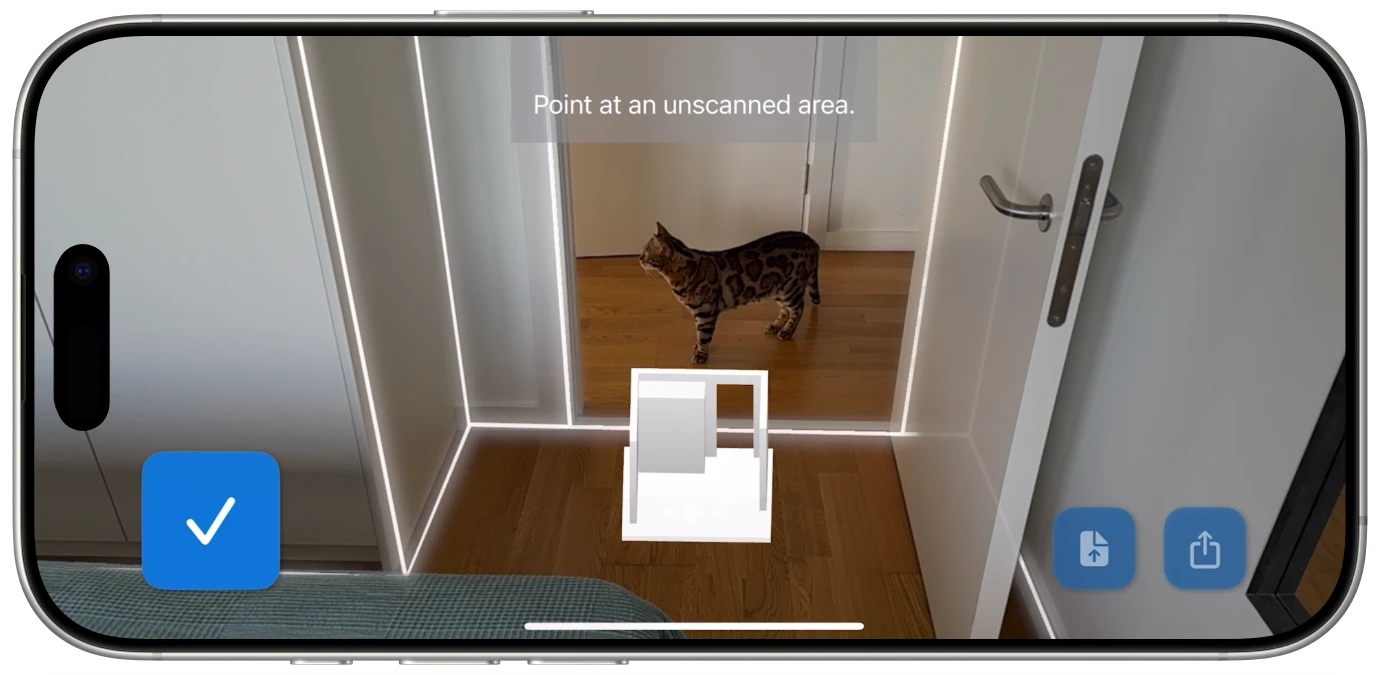
Walk the room with your iPhone or iPad. Flooring It maps every wall, corner, and doorway using LiDAR.
A sofa is the centerpiece of most living rooms, and getting the wrong size is a disaster. You need to know the wall length where it will go, the distance to adjacent furniture, the clearance for foot traffic, and the doorway width for delivery. A floor plan with real measurements lets you compare sofa dimensions against your actual space, not your memory of the space.
Bed frames are deceptively large. A queen bed frame is typically about 65 by 85 inches -- but with the headboard, footboard, and side rails, the total footprint can be much bigger. Add nightstands and you need to know exactly how wide the bedroom is, where the closet doors swing, and how much clearance you need to walk around the bed. Precise room dimensions make this straightforward.
Whether it is a home office or a corner of the bedroom, a desk needs to fit the space without making it feel cramped. You need to account for chair depth (including recline), monitor distance from the wall, and enough room to actually walk past without turning sideways. Scanning the room first means you can shop for desks knowing exactly what dimensions work.
Moving is stressful enough without discovering on move-in day that your dining table does not fit in the new apartment's dining area, your dresser is too wide for the bedroom alcove, and your bookshelf is two inches too tall for the space under the sloped ceiling.
The smart move -- literally -- is to scan your new place before the truck arrives. If you are apartment hunting, bring your iPhone to the viewing and scan the rooms while you are there. It takes a minute per room and gives you a measured floor plan you can reference while deciding what furniture comes with you and what gets sold or donated.
This works in both directions. Scan your current rooms to know the exact dimensions of your existing furniture layout. Then scan the new place to see if everything transfers cleanly. Comparing the two floor plans side by side tells you immediately whether your L-shaped sectional will work in the new living room or whether it is time to start browsing for a replacement.
For anyone who has ever rented a moving truck, carried furniture up three flights of stairs, and then had to carry it back down because it did not fit -- this kind of planning is not optional. It is self-preservation.
The floor plan lives on your phone. Pull it up in the furniture store, at the flea market, or while browsing online at midnight.

The best time to know your room dimensions is before you start shopping. The second best time is while you are shopping. With your room's floor plan on your phone, you can check furniture dimensions against your actual space anywhere -- in the showroom, at the thrift store, or sitting on your couch browsing an online catalog at 11 PM.
Furniture product pages always list dimensions: width, depth, height. Without knowing your room's measurements, those numbers are meaningless. "84 inches wide" means nothing if you do not know whether you have 90 inches or 78 inches of available wall space. But with a measured floor plan in hand, you can instantly evaluate whether a piece works. No mental math. No "I think it'll probably fit." Just numbers compared to numbers.
This is especially valuable for online furniture shopping, where you cannot physically stand in the room and eyeball it. The product page says the dining table is 72 by 36 inches. Your floor plan shows the dining area is 120 by 96 inches. Quick math tells you the table fits with 24 inches of clearance on each side for chairs -- perfect. That kind of confidence used to require a trip back home with a tape measure. Now it requires a glance at your phone.
Beyond the raw measurements, Flooring It exports to USDZ -- Apple's augmented reality format. This means you can view your scanned room as a 3D model and place it in your real environment using AR on your iPhone or iPad.
While this is not the same as placing a virtual sofa in your room (that is a different kind of app), it does give you a spatial understanding of the room that a flat floor plan cannot. You can view the room layout from different angles, get a sense of how the space flows, and understand proportions in three dimensions. It is a useful complement to the measured floor plan, especially for rooms with unusual shapes or features.
Export to USDZ for an AR-ready 3D model of your room. View it from any angle on your iPhone or iPad.

Some furniture purchases are especially high-stakes when it comes to dimensions. Here are a few situations where scanning your room first saves real headaches.
The sectional sofa. Sectionals are big, heavy, and difficult to return. They also come in dozens of configurations, and the difference between "fits perfectly" and "too big for the room" can be a matter of inches. Know your wall lengths and room width before committing.
The wardrobe or armoire. These are tall, deep, and often too heavy to shuffle around once placed. You need to know the floor space, the ceiling height, and whether the doors will open fully without hitting the bed. A floor plan gives you the first two. Common sense gives you the third.
The dining table. Tables need more clearance than people think. You need room for the table itself, plus enough space for chairs to be pulled out, plus walking room behind seated diners. The rule of thumb is 36 inches from table edge to wall, but that only works if you know where the walls are. Which brings us back to measuring the room.
The bookshelf or shelving unit. Wall-mounted or freestanding, shelves need to fit the available wall space without blocking outlets, light switches, or windows. A quick scan tells you exactly how much wall you have to work with.
Open Flooring It on your iPhone Pro or iPad Pro. Point your device at the room and walk the perimeter. The LiDAR scanner captures every wall, corner, and doorway. The whole thing takes about 60 seconds.
Review the floor plan on your device. Every wall segment is labeled with its measurement. You can see the room's full layout including doorways, alcoves, and any irregularities that might affect furniture placement.
Export the floor plan as a PDF and keep it on your phone. Whenever you are evaluating furniture, pull up the plan and compare the product's listed dimensions against your room's actual measurements. No guessing required.
Furniture shopping should be fun, not a gamble. When you know your room's exact dimensions, every purchase decision becomes easier. The sofa fits or it does not. The bed frame works or it does not. No more standing in a showroom trying to remember whether the living room is 12 feet wide or 14.
With Flooring It, a 60-second scan gives you measurements you can trust. Keep them on your phone, reference them whenever you need to, and buy furniture that actually fits the first time.
Flooring It requires an iPhone Pro (12 Pro or later) or iPad Pro (2020 or later) with LiDAR. It exports to PDF, SVG, USDZ, OBJ, Reality, and JSON formats. It is available in 23 languages.
Scan your rooms now. Thank yourself on delivery day.