From a 60-second LiDAR scan to architectural-quality vector diagrams. The space planning tool for people who work with rooms.
Space planning is the process of organizing a physical environment to support the activities that happen inside it. That sounds abstract, so here's what it looks like in practice: an architect figuring out where to place walls in a new office layout. An interior designer deciding how furniture flows through a living room. A facilities manager mapping cubicle assignments across three floors of a corporate building. An event planner determining how many round tables fit in a ballroom.
All of these tasks start with the same thing: an accurate diagram of the existing space. You can't plan what goes where until you know exactly what "where" looks like -- how wide the room is, where the doors and windows are, how the walls connect, what the total square footage is.
Traditionally, getting that diagram meant either finding existing architectural drawings (which are often outdated, lost, or never existed in the first place) or creating new ones from scratch. Creating new ones meant hiring a drafter, or spending a morning with a tape measure and graph paper, or using CAD software that requires a degree in engineering to operate.
There's now a much faster option. A space planning app powered by LiDAR can capture the geometry of any room in about 60 seconds and produce the kind of measured diagrams that used to take hours of manual work.
In architecture and construction, an "as-built" drawing documents a space exactly as it exists right now -- not how it was designed on paper, not how it was supposed to be built, but how it actually turned out. As-built drawings matter because buildings change. Walls get moved during construction. Renovations alter room layouts. The drawings from the original build are often inaccurate by the time anyone needs them.
Creating as-built floor plans has historically been one of the most time-consuming parts of any renovation or redesign project. An architect visits the site, takes dozens of measurements, photographs everything, returns to the office, and spends hours translating those measurements into a CAD drawing. For large buildings, this process can take days.
Flooring It collapses this workflow dramatically. Walk through each room with your iPhone or iPad, let the LiDAR scanner capture the geometry, and export measured floor plans on the spot. The SVG export produces clean vector diagrams that can be imported into design software for further refinement. The PDF export gives you a print-ready document with dimensions that you can hand to anyone on the project team immediately.

SVG vector diagram -- scales to any size, stays razor-sharp

Measured floor plan ready for space planning
The need for room diagrams and architectural drawings cuts across a surprising range of professions. Here's who reaches for a space planning app and why.
Architects need as-built drawings before they can design anything. For renovation projects especially, accurate documentation of the existing space is step one. A room diagram app that produces SVG and OBJ exports saves hours of field measurement and CAD drafting. The output from Flooring It can be imported directly into design tools for further development.
Interior designers work with room layouts constantly. They need dimensions they can rely on to specify furniture, plan traffic flow, and create visual presentations for clients. A quick LiDAR scan produces the measured room layout they need, and the SVG format integrates cleanly with the design software they already use.
Managing office space means knowing exactly what you have. How many desks fit in this room? What's the square footage of the third-floor conference area? Can we reconfigure the marketing department's space to add two more workstations? Facilities managers need accurate, up-to-date room diagrams -- and they need them for dozens or hundreds of rooms.
Event planners visit venues and need to figure out capacity, table layouts, staging placement, and guest flow. A room blueprint from a quick LiDAR scan gives them the dimensions to work with back at the office, rather than relying on measurements scribbled on a napkin or whatever the venue happens to have on file (often nothing).
Floor plans add significant value to property listings. Buyers and renters want to see room layouts before visiting in person. A room diagram maker that can produce professional-quality floor plans in minutes -- rather than requiring a separate photographer visit -- is a meaningful competitive advantage for agents.
Contractors need measurements to produce estimates, order materials, and plan construction sequences. Getting accurate as-built floor plans before starting work prevents costly errors. A 60-second scan that produces a measured PDF eliminates the back-and-forth of "can you re-measure that wall?" calls during a project.
Here's how Flooring It fits into a professional space planning workflow.
Walk into the room with your iPhone Pro or iPad Pro. Open Flooring It. The LiDAR scanner activates and begins mapping the room as you slowly pan around. The app provides real-time visual feedback showing detected walls, corners, and the room outline taking shape. A typical room scan takes about 60 seconds.
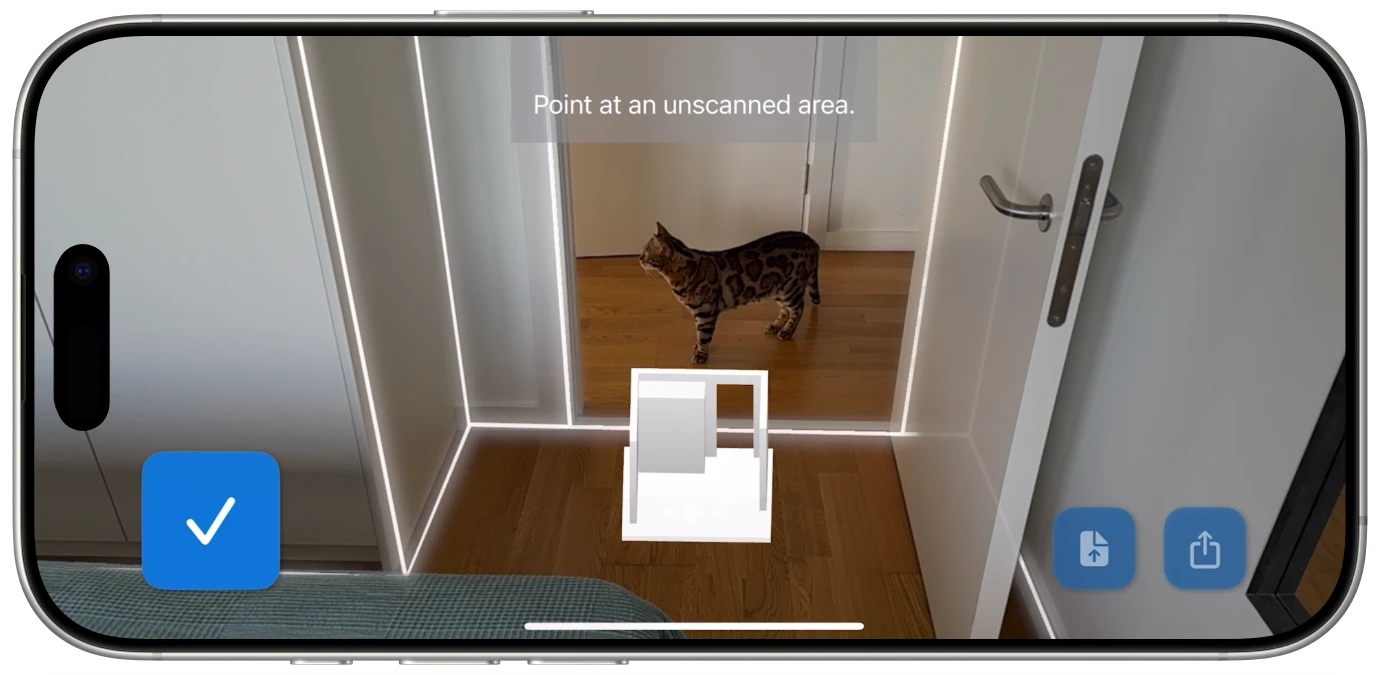
Once the scan is complete, you choose how you need the data. This is where Flooring It's six export formats become a real asset for professional workflows:
For many use cases, the Flooring It export is the final deliverable. The PDF is ready to print. The SVG is ready to present. But for professional workflows that require additional detail -- furniture placement, electrical layouts, plumbing routes -- the exports serve as an accurate starting point that saves hours of manual drafting.
The key insight is this: the most time-consuming part of creating an architectural diagram isn't adding the design details. It's getting the base measurements right. Flooring It handles the tedious part -- the accurate spatial capture -- so you can spend your time on the work that actually requires your expertise.
Of the six formats Flooring It exports, SVG deserves special attention for space planning workflows. SVG (Scalable Vector Graphics) is a vector format, which means the diagrams are defined mathematically rather than as pixels. This has several practical implications:
An SVG floor plan looks sharp whether you're viewing it on a phone screen or printing it on a 36"x48" architectural sheet. There's no resolution limit and no quality loss at any size. This matters for space planning because floor plans frequently need to be printed at multiple scales -- a small version for a project binder and a large version for the job site wall.
SVG files can be opened and edited in any vector graphics application -- Adobe Illustrator, Figma, Affinity Designer, Inkscape (which is free), or even a web browser. This means you can take the floor plan Flooring It generates and add furniture layouts, annotations, dimensions, color coding, or any other information your project needs.
Because SVG stores mathematical descriptions rather than pixel data, the files are remarkably compact. A detailed floor plan might be 50KB as an SVG versus several megabytes as a high-resolution image. This makes SVGs easy to email, embed in presentations, and share across project teams without worrying about file size limits.
SVG files can be embedded directly in web pages, which is useful for real estate listings, portfolio websites, or any situation where a floor plan needs to appear online. They render crisply on every screen, from phones to 4K displays, without requiring multiple resolution variants.

Measured floor plan output -- accurate dimensions from a 60-second scan
Space planning tools have evolved through several distinct phases. Understanding where we are helps explain why LiDAR-based scanning represents such a significant step forward.
For most of architectural history, floor plans were drawn by hand on drafting paper using T-squares, triangles, and technical pens. This required specialized skill and significant time. A simple room layout might take an hour; a full building floor plan could take days. The results were beautiful but inflexible -- any change meant starting over or painstaking correction.
Computer-aided design moved floor plans to the screen. AutoCAD, launched in 1982, became the industry standard. CAD was faster than hand drafting and allowed easy editing, but it still required manual data entry. Someone had to go to the site, take measurements, and then recreate the space in the software. The bottleneck shifted from drafting skill to measurement accuracy.
Starting around 2012, mobile apps began using phone cameras and computer vision to estimate room dimensions. This was a genuine leap -- suddenly anyone with a smartphone could create a rough floor plan. But "rough" was the operative word. Photo-based methods estimated dimensions rather than measuring them, and accuracy depended heavily on lighting, room complexity, and user technique.
This is where we are now. LiDAR replaces estimation with direct measurement. The sensor measures distances to every surface, producing consistent floor plans without manual input. Apps like Flooring It combine direct LiDAR measurement with instant export to professional formats. The entire workflow -- from walking into a room to having an architectural-quality diagram -- takes about 60 seconds.
For space planners, this means the tedious data-gathering phase of every project has been compressed from hours to minutes. More time for design. Less time measuring walls.
If you're using Flooring It for professional space planning work, these tips will help you get the most accurate and useful output.
For multi-room spaces, scan each room as a separate capture rather than trying to scan an entire floor at once. This produces cleaner, more accurate results for each room and makes it easier to organize and label your exports.
The iPad Pro's larger display makes it easier to see the scan in progress, especially in bigger rooms. The M4 iPad Pro also offers faster processing, which can improve real-time feedback during scanning. For professional use, the iPad is the premium experience.
Always save the JSON export alongside whatever format you need immediately. The JSON file contains the complete room geometry data, which means you can re-export to any other format later without returning to the physical space. Think of it as your archival copy.
If you're going to add furniture layouts, annotations, or other design elements on top of the floor plan, start with the SVG export. It's the most flexible format for downstream editing and integrates cleanly with professional design tools.
Whether you're an architect documenting existing conditions, a designer planning furniture layouts, a facilities manager tracking office space, or an event planner checking venue dimensions, the workflow starts the same way: you need an accurate diagram of the room.
Flooring It creates that diagram in 60 seconds -- with LiDAR accuracy, in six professional export formats, from the device you already carry. It's the architectural drawing app that fits in your pocket and produces results that hold up in professional workflows.
Professional room diagrams from a 60-second scan. Try it on your next project.