Ditch the tape measure. Your phone has a laser scanner built in.
A room scanner app turns your iPhone or iPad into a digital measuring device. Instead of stretching a tape measure from wall to wall, scribbling numbers on a napkin, and then realizing you forgot to measure the closet, you just point your phone at the room and let it do the work.
The concept is straightforward: walk around the space while your device captures the geometry of every wall, corner, and doorway. When it's done, you have a complete set of room dimensions stored digitally -- ready to export, share, or obsess over.
Room scanner apps have been around in various forms for years, but they used to rely on your phone's camera and some optimistic guesswork to estimate distances. The results were... approximate. Sometimes hilariously approximate. But then Apple put a LiDAR scanner on the iPhone Pro and iPad Pro, and suddenly your phone could measure rooms with the kind of accuracy that used to require expensive professional equipment.
Flooring It is a room scanner app built specifically to take advantage of that LiDAR hardware. It captures room measurements in about 60 seconds, then lets you export the results in the file format you actually need. PDF export is free and unlimited, printed with a light watermark; a one-time Pro purchase removes the watermark and unlocks the other five formats. No subscriptions, no account, and no "upgrade to unlock the save button" nonsense.
Scanning a room with Flooring It is about as complicated as taking a video. Here's the whole process:
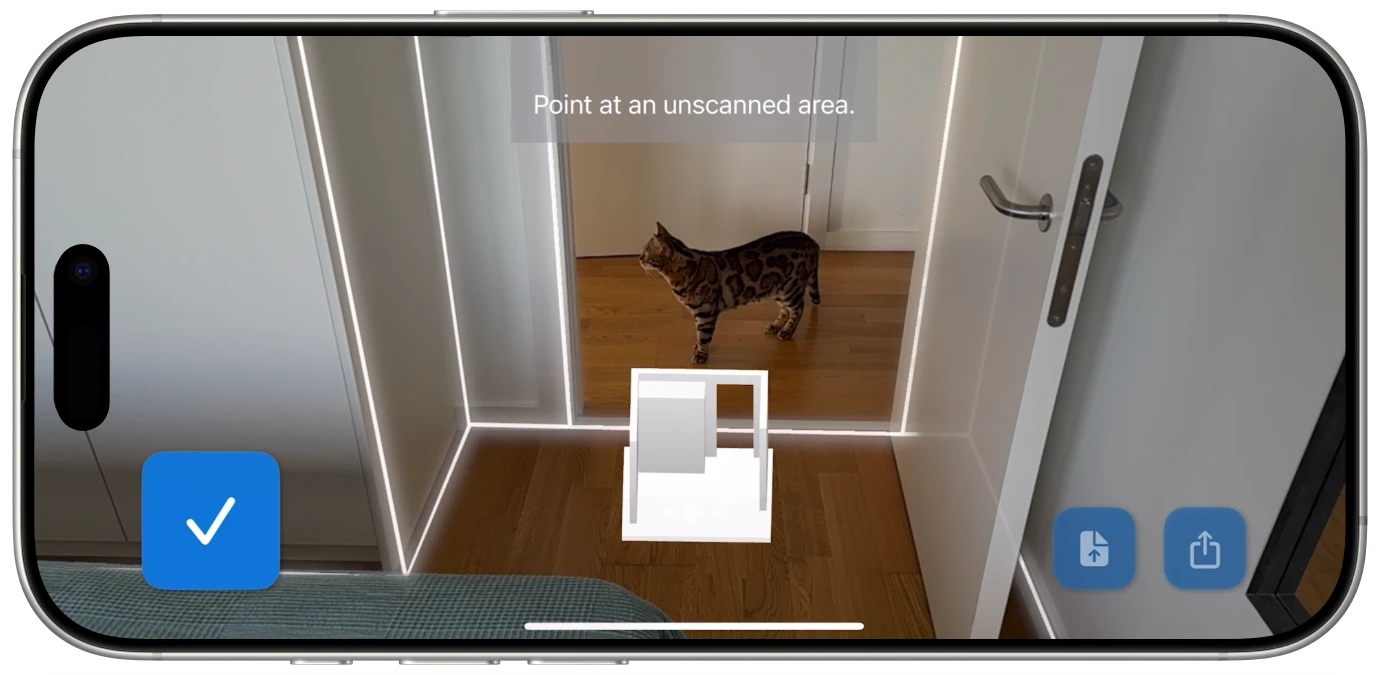
Step 1: Open Flooring It and tap Scan. Your device's LiDAR sensor activates and starts reading the space around you. You'll see walls and surfaces lighting up in real time on your screen as the scanner maps them.
Step 2: Walk slowly around the room. Point your iPhone or iPad at the walls and move along the perimeter. The app shows you exactly what it's captured and what it still needs, so you know when to keep going and when you're done. No guessing. The live visual feedback means you can see corner detection and wall boundaries as they're identified.
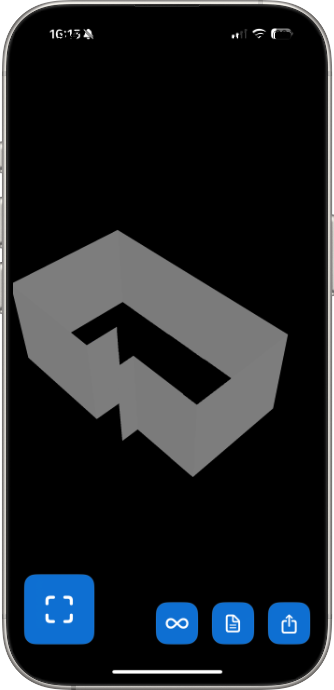
Step 3: Tap Done. That's it. Flooring It processes the scan and generates a floor plan with room dimensions. The whole thing takes about 60 seconds for an average-sized room.
Step 4: Export. Choose from PDF, SVG, USDZ, OBJ, Reality, or JSON. Each format serves a different purpose, from printing a simple floor plan to importing a 3D model into professional design software.
Look, tape measures aren't going anywhere. They're great tools. But for measuring an entire room? They have some well-documented limitations that anyone who's tried to measure a room solo understands intimately.
You need two hands and ideally a second person. Measuring a 15-foot wall by yourself involves hooking the tape on one end, walking to the other, and hoping the tape doesn't retract violently into its housing and smack you in the fingers. A room measurement app on your iPhone eliminates this one-person circus act entirely.
You need to write everything down. Every measurement needs to be recorded somewhere. Then you need to figure out how all those numbers relate to each other spatially. Then you discover your handwriting is illegible and one of the measurements says either "8'4" or "9'4" and now you're back at square one. With a digital room measurement tool, every dimension is captured, stored, and organized automatically.
Complex rooms are a nightmare. L-shaped rooms, rooms with alcoves, rooms with bay windows -- these eat tape measure users alive. A room scanner captures the entire geometry at once, including all the weird angles and irregular shapes that would take you 45 minutes to measure manually.
You can't easily share a tape measure reading. After you've spent 20 minutes measuring a room, all you have is a list of numbers. To share it meaningfully, you'd need to draw a floor plan. With Flooring It, the floor plan is generated automatically and can be shared as a PDF in seconds.
Tape measures don't do 3D. If you need a three-dimensional model of a room -- for AR visualization, interior design software, or 3D rendering -- a tape measure simply can't help you. An iPhone room scanner captures the room in three dimensions from the start.
This is the question everyone asks, and it's the right one to ask. A room scanner that produces beautiful but inaccurate floor plans is just a fancy toy.
Flooring It uses Apple's LiDAR scanner, which fires invisible laser pulses and measures the time it takes for each pulse to bounce back. This is the same fundamental technology used in self-driving cars and professional surveying equipment. The LiDAR sensor on iPhone Pro and iPad Pro devices captures millions of data points to build a detailed spatial map of your room.
For most residential and commercial rooms, the results are accurate enough for furniture planning, renovation estimates, real estate listings, and insurance documentation. We're talking about the kind of accuracy that used to require hiring someone with a laser distance meter and a clipboard.
That said, let's be honest about the edges. LiDAR scanning is not a replacement for a professional survey when you're doing structural engineering work or submitting architectural plans to a building department. It's a room dimensions app designed for quick, reliable measurements when you need them fast -- not a substitute for a licensed surveyor when the stakes involve load-bearing walls.
But for the 99% of situations where you need to know how big a room is -- shopping for furniture, planning a layout, getting renovation quotes, creating a listing, or just settling a bet about whether the living room is really 400 square feet -- Flooring It gives you instant room measurements you can trust.

More people than you'd think. The room size calculator app category has exploded in the last few years, and the use cases extend well beyond interior design.
Homeowners and renters. You're buying furniture online and need to know if that sectional will actually fit. You're planning a renovation and need measurements for contractor quotes. You're moving and want to plan your new layout before the truck shows up. A quick room scan gives you every dimension you need in a minute.
Real estate professionals. Agents and property managers need accurate room measurements for listings, and they need them fast. Walking into a property with an iPad Pro, scanning each room, and having exportable floor plans before the walkthrough is over is a serious competitive advantage.
Interior designers and architects. The initial site measurement is the foundation of every design project. Using a room scanner with measurements speeds up this process dramatically, and the SVG and OBJ exports integrate directly into professional design workflows.
Contractors and tradespeople. Flooring installers need square footage. Painters need wall areas. Electricians need room layouts. A room measurement app on an iPad gives them quick reference measurements without pulling out a laser distance meter for every job.
Insurance adjusters and claims professionals. Documenting room dimensions for insurance purposes is faster with a scan than with manual measurements, and the digital export provides a clean record for the file.
Event planners. Planning a layout for a venue? A 60-second scan gives you a floor plan to work with, and the 3D export lets you visualize table arrangements and staging before the event.
Flooring It works on both iPhone Pro and iPad Pro, but each device has its strengths for room scanning.
Scanning with iPhone Pro is more convenient. Your phone is always in your pocket, so you can scan a room anytime the need arises -- at an open house, in a store, during an apartment viewing. The iPhone's smaller form factor also makes it easier to hold steady while walking and scanning. For quick room measurements, the iPhone Pro is hard to beat.
Scanning with iPad Pro gives you a bigger screen, which makes the live scanning feedback easier to see. The larger display is especially helpful when reviewing floor plans and exports after the scan. If you're doing multiple scans in a day -- like documenting an entire property -- the iPad's larger battery also helps.
Both devices use the same LiDAR scanner hardware, so the measurement quality is identical. The choice between them is really about convenience versus screen real estate.
One thing to note: you need a device with LiDAR. That means iPhone 12 Pro or later (Pro and Pro Max models only), or iPad Pro 2020 or later. Standard iPhone and iPad models don't have LiDAR and can't run room scanning features. If you're not sure whether your device qualifies, check the back -- the LiDAR sensor is the small dark circle near your rear cameras.
Flooring It is designed to be dead simple, but a few habits will get you even better results.
Move slowly and steadily. The LiDAR sensor needs a moment to read each surface. Walking at a normal pace works fine, but rushing through a room can cause gaps in the scan. Think "walking through a museum" rather than "late for a flight."
Keep the device pointed at the walls. LiDAR needs line-of-sight to surfaces. Aiming at the floor or ceiling the whole time won't capture wall boundaries effectively. Hold your device roughly at chest height and angle it toward the walls as you walk the perimeter.
Watch the live feedback. Flooring It shows you exactly what it's captured in real time. If you see a section of wall that hasn't been mapped yet, just point at it for a moment. The app's visual feedback takes the guesswork out of knowing when you have a complete scan.
Clear the floor if possible. LiDAR can sometimes read furniture, boxes, or clutter as wall surfaces. For the cleanest measurements, scanning an unobstructed room gives the best results. That said, Flooring It is smart enough to handle most normally-furnished rooms without issues.
Good lighting helps, but isn't critical. Unlike camera-based scanning apps, LiDAR works by firing its own infrared laser pulses. It doesn't rely on ambient light the way a camera does. You can scan in a dimly lit basement and still get solid measurements. That said, the camera view on your screen will be easier to see with decent lighting.
The scan itself takes about 60 seconds. But the value comes from what you do with it next.
Flooring It exports to six formats, each designed for a different workflow. Need a simple floor plan with room dimensions to print or email? Export a PDF. Need a vector diagram you can scale infinitely for a presentation or design file? SVG has you covered. Working in 3D software or want to view your room in augmented reality? USDZ and OBJ exports give you a full three-dimensional model.
You can also save your scan as a JSON file, which preserves all the raw room geometry data. This is particularly useful because you can reopen a JSON file in Flooring It later and export it to any other format -- no need to rescan. Measured your bedroom six months ago and now need an OBJ file for a renovation project? Just open the JSON and export.
Every export goes through the standard iOS share sheet, so you can AirDrop files to your Mac, email them, save them to Files or iCloud, or send them through any messaging app. The whole process -- from walking into a room to having a shareable floor plan in someone's inbox -- can take under two minutes.
For a detailed breakdown of every export format and when to use each one, check out the complete export format guide.
Turn any room into a measured floor plan in 60 seconds flat.