Why a Markdown Editor on Your Phone?
At first glance, a markdown editor on an iPhone might seem like a stretch. Phones are for quick texts and scrolling, not for writing documents. Right?
Except that's not how most people actually use their phones. You're on the train and you want to draft a blog post. You're at a coffee shop and an idea hits you. You're reviewing a README before a meeting and spot a typo. You're in a lecture and need to take notes in a format you can actually use later.
For all of these situations, you want a markdown editor that works well on a small screen, not a desktop app squeezed into a mobile layout. Indent was built for this. It's a native iOS app that respects the constraints of a phone while giving you the full power of a markdown editor.
Indent on iPhone
The iPhone version of Indent is designed for the screen you're actually working with. That means a few things:
A single view at a time. On a phone, split view would just give you two cramped columns. Instead, Indent lets you switch between Editor and Preview modes with a tap. You write in one, review in the other, and the transition is instant.
A smart formatting toolbar. Above the keyboard, Indent provides quick access to the formatting commands you use most. Bold, italic, headings, links, code, and lists are all one tap away. No need to remember or type out markdown syntax if you don't want to.
Dynamic Type support. Indent respects your system text size setting. If you've set your iPhone to use larger text, Indent follows that preference. If you prefer smaller text to fit more on screen, that works too. This is an accessibility feature that native apps handle automatically, and Indent takes full advantage of it.
Gesture navigation. Swipe back to return to your file list. Use the standard iOS gestures you already know. Indent doesn't invent its own navigation system. It uses the one Apple built, which means your existing iPhone habits carry over.
The iPhone is ideal for quick edits and short writing sessions. Draft a note on your commute, clean it up on your Mac later. Since Indent works with standard markdown files in iCloud or your file system, your documents are available everywhere.
Indent on iPad
The iPad is where Indent really stretches its legs. With more screen space and optional keyboard support, the iPad version offers an experience that sits comfortably between the phone and the Mac.
Split View Editing
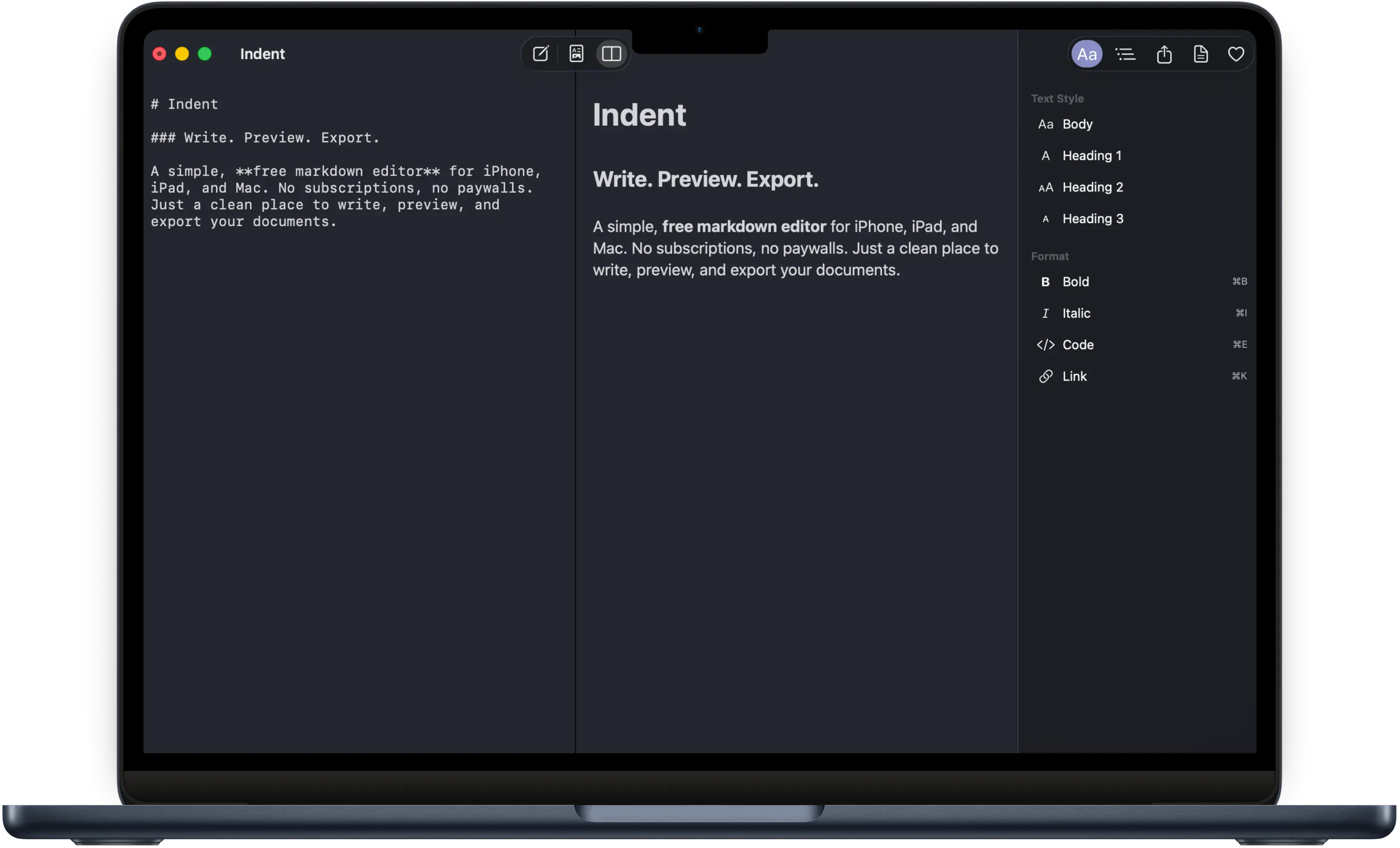
On iPad, Indent supports split view: your markdown editor on the left, your rendered preview on the right. The two panes scroll independently, so you can write in one spot and check the formatting of another section at the same time. For longer documents, this is genuinely useful.
External Keyboard Support
Connect a Magic Keyboard, Smart Keyboard, or any Bluetooth keyboard, and Indent becomes a desktop class writing tool. All the keyboard shortcuts work: Command+B for bold, Command+I for italic, Command+K for links. If you've used a Mac keyboard, you already know how to use Indent on iPad with a keyboard attached.
iPad Multitasking
Indent supports iPadOS multitasking. Use it in Split View alongside Safari for research, or in Slide Over for quick reference while you work in another app. The layout adapts to whatever space it's given, whether that's the full screen or a narrow sidebar.
Bi Directional Editing on Mobile
One of Indent's signature features is bi directional editing, and it works just as well on iPhone and iPad as it does on Mac.
In the preview, you can select text and apply formatting. Indent writes the corresponding markdown for you. This is particularly nice on mobile, where typing out asterisks and brackets on a touch keyboard is tedious. Instead of typing **bold text**, you can select the words in the preview and tap the bold button. Indent does the rest.
In the editor, you write raw markdown as usual. Switch to the preview to see how it looks. Switch back to make changes. The two modes are different ways of interacting with the same document, and both are fully editable.
Export from Anywhere
The whole point of writing is sharing what you wrote. On iPhone and iPad, Indent exports through the native share sheet, which means you can:
- Export to PDF with proper typography. Send it via email, save it to Files, or AirDrop it to someone.
- Export to HTML with responsive layout and dark mode support. Great for sharing a document someone can open in any browser.
- Export as Markdown for use in other tools or platforms.
Because Indent uses the system share sheet, your exports work with any app that accepts files. Messages, Mail, Slack, Notion, Google Drive, whatever you use.
It Works with Your Files
Indent doesn't have its own proprietary format or database. It reads and writes standard markdown files. You can open files from iCloud Drive, On My iPhone, On My iPad, or any third party file provider that's integrated with the iOS Files app.
This means you can write a document on your iPhone during lunch, pick it up on your iPad that evening, and finish it on your Mac in the morning. The file is the same file everywhere. No sync service to configure, no account to create, no import/export dance. Just open the file and continue where you left off.
What About Other Mobile Markdown Editors?
The mobile markdown editor space is surprisingly thin. Most of the well known editors are primarily desktop apps with mobile versions that feel like afterthoughts. Small text, tiny buttons, and layouts that were clearly designed for a 27 inch monitor and then shrunk to fit a phone.
Some apps go the other direction and focus exclusively on note taking, which means they have organizational features like tags and notebooks but are weaker on the actual writing and export side.
Indent sits in a specific spot: it's a proper markdown editor that was designed to work well on every screen size, from a 4.7 inch iPhone SE to a 13 inch iPad Pro. The interface adapts to the device, not the other way around.
And it's free. No subscription, no in app purchases, no ads. On a platform where most quality markdown apps charge $30 or more per year, that matters.
Built with SwiftUI
Indent is a native app built with SwiftUI, Apple's modern framework for building user interfaces. This isn't just a technical detail for developers to care about. It affects your experience directly:
- Performance. Native apps are faster and use less memory than web based alternatives. Indent launches quickly and scrolls smoothly, even with long documents.
- Accessibility. Dynamic Type, VoiceOver, and other accessibility features work automatically because Indent uses the system's built in support for them.
- System integration. The share sheet, the Files app, iCloud, keyboard shortcuts, multitasking: all of these work because Indent speaks the same language as iOS and iPadOS.
- Battery life. Native apps are more efficient. You won't notice Indent draining your battery the way some heavier apps do.
Themes on Mobile
Indent offers three appearance options: System, Light, and Dark. System follows your device's current setting, so if your iPhone switches to dark mode at sunset, Indent switches with it. Light and Dark let you override that and pick whichever you prefer regardless of your system setting.
Each theme is tuned for readability on mobile screens. The contrast ratios, text colors, and background tones are all chosen to be comfortable for extended reading and writing sessions, even on smaller displays.
Get Indent on iPhone and iPad
Indent is a universal app. Download it once from the App Store and it runs on your iPhone, iPad, and Mac. No separate purchases, no platform specific versions. One download, every platform.
It's free with no strings attached. No subscription, no trial, no account required. Open the App Store, search for Indent, and start writing.