The Markdown Editor Market Has a Pricing Problem
If you've ever searched for a markdown editor, you've probably noticed something: almost all of them cost money. Not just a little money, either. Subscriptions of $30, $40, even $50 a year are common. One time purchases of $15 to $30 are the budget option. And the truly free ones? They're usually bare bones text editors with "markdown support" tacked on as an afterthought.
That's the gap Indent fills. It's a proper markdown editor with genuine features, built natively for Apple platforms, and it costs nothing. Not "free with ads," not "free trial," not "free tier with locked features." Just free.
Let's walk through exactly what you get.
Bi Directional Editing
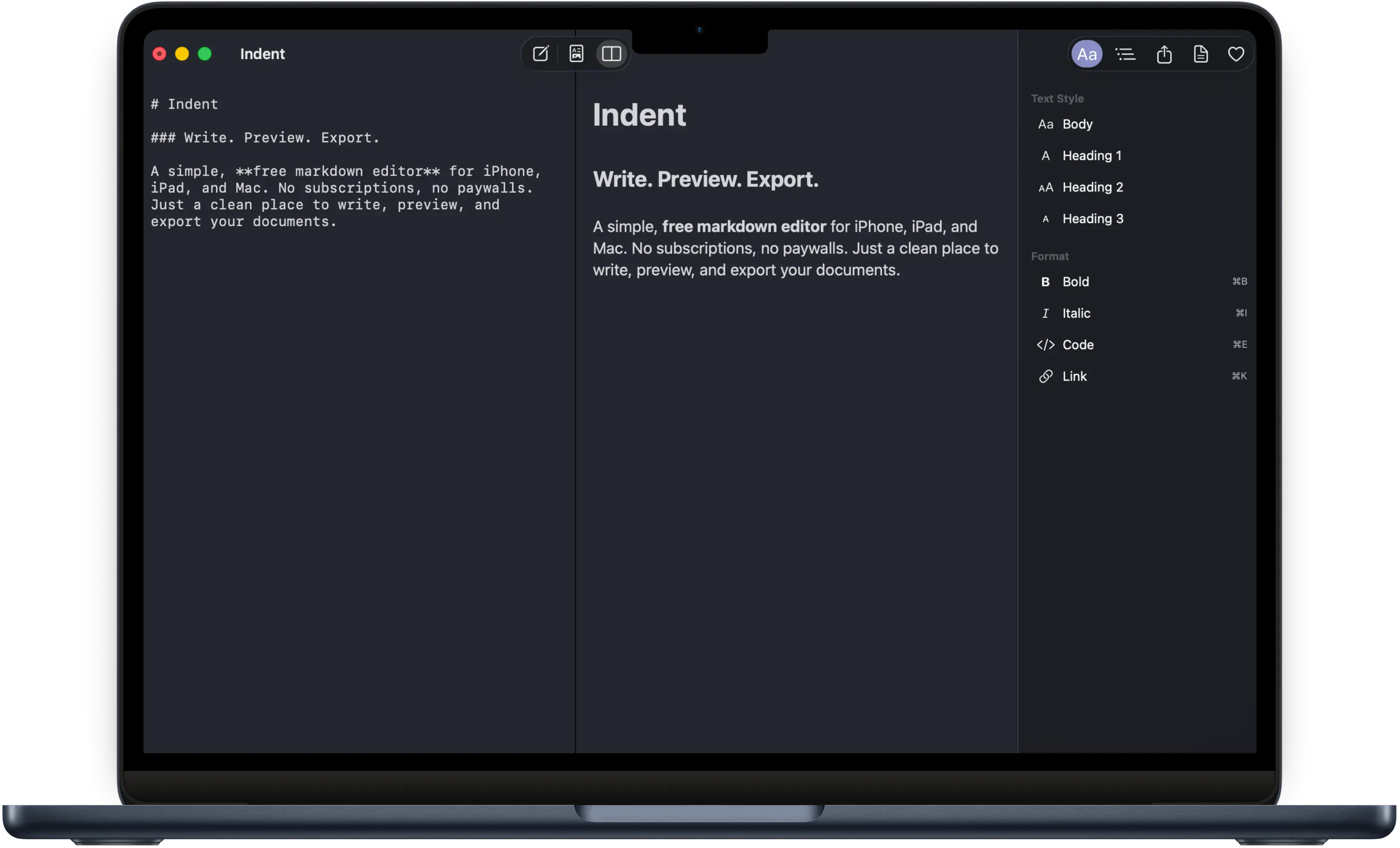
This is the feature that separates a real markdown editor from a text editor with syntax highlighting. In Indent, you can write in the markdown source view the traditional way, typing out your hashtags, asterisks, and brackets. But you can also edit directly in the rich preview. Select some text in the preview, make it bold, and Indent writes the corresponding markdown for you.
Most free markdown editors give you a text box and a preview pane, and that's it. You type markdown on the left, you see the result on the right, and the preview is read only. Indent's bi directional approach means you can work whichever way feels natural at the moment. Writing a quick draft? Type in markdown. Cleaning up formatting for a colleague? Click around in the preview.
Bi directional editing is typically a premium feature you'd find in apps like Typora (which charges $15) or Ulysses (which charges $50 per year). In Indent, it's included from day one.
Three View Modes
Indent gives you three ways to look at your document:
- Editor mode shows your raw markdown. This is where you go when you want full control over your formatting and want to see exactly what's in your file.
- Preview mode renders your markdown into a clean, typographically sound document. Headings are properly sized, code blocks are highlighted, and links are clickable.
- Split mode shows both side by side. Write on the left, see the result on the right. This is particularly useful on Mac and iPad where you have enough screen space to make both panes comfortable.
You can switch between these modes at any time. On Mac, it's a keyboard shortcut away. On iPhone and iPad, a quick tap in the toolbar.
Document Outline
As you write, Indent automatically builds a table of contents from your headings. This outline panel lets you jump to any section of your document instantly. If you're working on something longer than a few paragraphs, this turns into one of those features you didn't know you needed until you have it.
The outline updates in real time as you add, remove, or rename headings. It's a small thing that makes a big difference when you're navigating a ten page document.
Export to PDF, HTML, and Markdown
Writing in markdown is great. But eventually you need to share your work with someone who doesn't know what markdown is, and that person probably wants a PDF.
Indent exports to PDF with proper typography. That means your headings, body text, code blocks, and lists are laid out with care, not just dumped onto a page. The result looks like a real document, not a screenshot of a text editor.
You can also export to responsive HTML, complete with dark mode support. This is useful if you're writing something for the web or want to send someone a file they can open in any browser. And of course, you can export as clean Markdown for use in other tools, on GitHub, or anywhere else that speaks markdown.
Themes: System, Light, and Dark
Indent ships with three appearance options. System follows your device's current setting, so it automatically switches between light and dark as your Mac, iPhone, or iPad does. Light mode gives you a clean, bright writing surface. Dark mode gives you white text on a dark background for writing at night or just because you prefer it.
These aren't just color swaps. The typography, contrast ratios, and UI elements are all tuned for each theme so everything remains readable and comfortable regardless of which one you choose.
Native on Every Apple Platform
Indent is built with SwiftUI and runs natively on macOS, iPadOS, and iOS. This matters more than you might think.
On Mac, native means proper keyboard shortcuts (Command+B for bold, Command+I for italic, and dozens more), standard window management, a menu bar with all the options you'd expect, and an inspector panel that works like inspector panels do in every other Mac app. It means Indent doesn't feel like a web page pretending to be an app.
On iPad, native means support for external keyboards with full shortcut support, proper split view with other apps, and a layout that takes advantage of the larger screen. On iPhone, it means gesture navigation, Dynamic Type for adjustable text size, and an interface that respects the conventions of iOS.
A surprising number of "Mac apps" are actually Electron wrappers around web technology. They work, but they don't feel right. They're slower, they use more memory, and they don't integrate with the operating system the way a native app does. Indent is not one of those apps.
What Does "Free" Actually Mean?
Let's be specific, because "free" gets thrown around loosely in the App Store:
- No subscription. There is no monthly or yearly fee. Not now, not later.
- No in app purchases. Every feature is available from the moment you download it.
- No ads. The app doesn't show you advertisements of any kind.
- No account required. You don't need to sign up, provide an email address, or create a login to use Indent.
- No trial period. There's no countdown timer. The app doesn't expire.
You download it from the App Store, open it, and start writing. That's it.
How Does Indent Compare on Price?
Here's an honest look at what the most popular markdown editors cost:
| App | Price | Model |
|---|---|---|
| Ulysses | $50/year | Subscription |
| Bear Pro | $30/year | Subscription |
| iA Writer | $50 once | One time purchase |
| Typora | $15 once | One time purchase |
| Obsidian | Free (sync $8/mo) | Freemium |
| Indent | Free | Completely free |
These are all good apps. Bear has a beautiful design. Ulysses is a powerhouse for professional writers. iA Writer is the gold standard for focused writing. Typora pioneered the seamless editing experience. Obsidian has built an incredible ecosystem for knowledge management.
But if you need a markdown editor that handles the fundamentals well, writing, previewing, and exporting, Indent covers all of that without asking for your credit card.
Who Is Indent For?
Indent is built for people who write in markdown and want a clean, reliable tool to do it with. That includes:
- Students who need to write papers and notes but don't want to pay for yet another subscription.
- Developers who write READMEs, documentation, and blog posts and want something nicer than a plain text editor.
- Writers who've discovered markdown and want a dedicated editor without the complexity of a full publishing platform.
- Anyone who's tired of paying for basic text editing features.
If you need a Zettelkasten system, wiki style linking, or a database of interconnected notes, Indent isn't trying to be that. It's a markdown editor. It does that one thing, and it does it well.
Available on Mac, iPhone, and iPad
One app, one download, three platforms. Indent is a universal app, meaning you download it once from the App Store and it runs on your Mac, your iPhone, and your iPad. The interface adapts to each platform, but the core experience is the same everywhere: write markdown, see it rendered beautifully, export it when you're ready.
There's no web version and no Windows or Android support. Indent is built for Apple platforms, and that focus is what lets it feel truly native on each one.
Get Started
Indent is available now on the App Store. Download it, open a new document, and start writing. You'll have a bi directional markdown editor with split view, document outline, PDF export, and three beautiful themes, all without spending a cent.
No sign up form. No credit card. Just a free markdown editor that works.