Flight data belongs in the sky, not on a map.
An AR flight tracker does something that sounds obvious once you hear it: it shows you flight information overlaid on the actual sky, through your phone's camera, right where the planes are.
Traditional flight trackers show you a map. You see your region from above, with little airplane icons scattered across it, each one representing a live flight. Tap an icon and you get the details. It's a perfectly good system for tracking a specific flight or browsing air traffic in an area. But when a plane flies over your head and you want to know what it is, a map creates a disconnect. You're looking up. The map is looking down. You have to mentally bridge the gap between a physical aircraft in the sky and a tiny symbol on a flat screen.
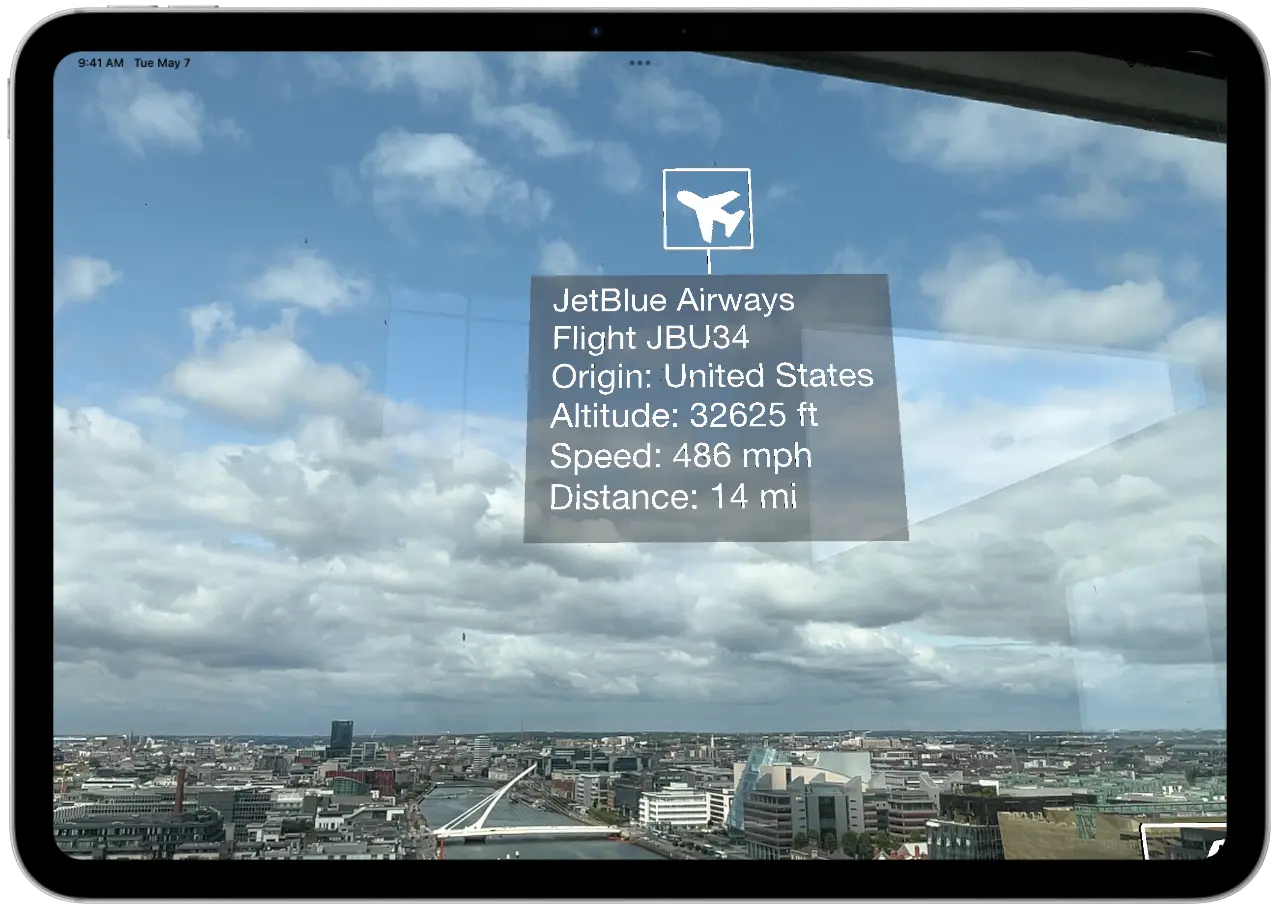
An augmented reality flight tracker removes that disconnect entirely. You hold up your phone, point it at the sky, and the flight data appears through your camera view, positioned right next to the actual aircraft. No map. No matching. The information is spatially anchored to the plane you're looking at.
Plane and Simple is a free AR flight tracker built for iPhone and iPad. It pulls live flight data from the OpenSky Network, uses Apple's ARKit to understand the spatial environment, and combines them to place flight information cards in 3D space relative to real aircraft. The result is an experience that feels less like checking an app and more like having a heads up display for the sky.
Plane and Simple sits at the intersection of three systems that each do something essential. Here's how they fit together.
OpenSky Network provides the flight data. OpenSky is a community driven network of ADS B receivers that track aircraft positions globally. ADS B (Automatic Dependent Surveillance Broadcast) is the system most aircraft use to broadcast their position, altitude, speed, and identification. OpenSky aggregates this data from thousands of receivers worldwide and makes it available through an API. When you open Plane and Simple, the app queries OpenSky for every aircraft within about 30 kilometers of your GPS position in any direction and receives a stream of live data including call signs, origin countries, altitudes, ground speeds, and precise coordinates.
Apple ARKit provides spatial awareness. ARKit is Apple's augmented reality framework, and it's the reason the flight data appears in the right place on your screen. When you hold up your phone, ARKit uses a combination of your device's camera, accelerometer, gyroscope, and compass to understand exactly where your device is pointing in 3D space. It knows the direction, the angle, and how those change as you move the phone. This spatial understanding is what allows the app to anchor information cards to specific positions in the sky and keep them stable as you look around.
Your camera provides the real world view. The live camera feed is the canvas everything else sits on top of. It's what makes the experience augmented reality rather than just a data display. You see the actual sky, the actual planes, and the flight data floating among them. The camera view gives you the immediate, visceral connection between the information and the physical world that makes an AR flight tracker fundamentally different from a map.
Plane and Simple stitches these three layers together in real time. The GPS and OpenSky data tell the app where each aircraft is in geographic coordinates. ARKit converts those coordinates into positions relative to your device. The camera provides the visual anchor. The result: floating information cards that appear to hang in the sky exactly where each plane is.
These are not competing tools. They're different tools for different moments. But the differences matter.
Traditional flight trackers excel at monitoring. If you're waiting for someone's flight to land, tracking a specific flight number, or studying traffic patterns at an airport, a map based tracker like Flightradar24 or FlightAware is the right tool. You can search by flight number, see departure and arrival gates, check delay status, and view historical route data. The map gives you a god's eye view of an entire region's air traffic at once. That's incredibly useful, and no AR app replaces it.
An AR flight tracker excels at identification. You see a plane. You want to know what it is. Right now. That's the moment where pointing your phone at the sky and getting an instant answer beats opening a map, zooming in, and trying to figure out which icon matches. The AR approach is faster, more intuitive, and more satisfying for this specific use case. You're not studying air traffic. You're answering a question about a specific plane you can see with your eyes.
The mental model is different. A map tracker asks you to think abstractly: "This dot on the map, at this position, moving in this direction, probably corresponds to that plane I see." An AR flight tracker asks you to do nothing but point. The connection between the data and the aircraft is visual and immediate. There's no translation step.
The best setup for someone who genuinely loves watching planes? Both. Use the map tracker when you want to browse, plan, or monitor. Use the AR tracker when a plane flies over and you want to know what it is without thinking about it.
Each detected aircraft gets a floating information card positioned in AR space. The cards display real time data updated as the planes move.
You'll see the aircraft's call sign, which identifies the flight. For commercial airlines, this is usually the flight number. For private aircraft, it's the registration. The route comes from a database of hundreds of thousands of flights built into the app, so origin and destination appear even with no signal. Altitude and speed give you a snapshot of the flight's current state, whether it's cruising at altitude or in an approach phase. And distance from your position adds a spatial dimension that map trackers rarely provide. You get a direct sense of how far away each plane is from where you're standing.
The information cards orient toward your device for readability, and airplane icons indicate each aircraft's heading direction. The interface stays stable and readable as you move your phone around, scanning different parts of the sky. If there are multiple planes visible at once, each one gets its own card, so you can pan across the sky and read them one by one or take in the whole scene at a glance.

Plane and Simple runs on a wider range of devices than you might expect for an AR app.
The app needs iPhone XS or XR and newer, or iPad 7th generation and newer, on iOS or iPadOS 18.5 or later. You do not need a Pro model. You do not need LiDAR. Plane and Simple uses ARKit's motion tracking and compass data to position flight information in 3D space, which works with the standard sensor suite found in any ARKit compatible device.
On the performance side, Plane and Simple uses smart data caching and location based API calls to keep things smooth. The app fetches flight data for the 30 km box around you and updates it at intervals that balance freshness with battery life. The AR rendering is lightweight. Information cards are text based elements positioned in 3D space, not complex 3D models, so the GPU load is minimal. You can use the app for extended plane spotting sessions without your phone turning into a hand warmer.
GPS accuracy matters for positioning flight data correctly, and modern iPhones and iPads have excellent GPS receivers. The compass heading and motion sensors work together with ARKit to maintain stable card positions even as you move around. If you're standing still and slowly scanning the sky, the experience is at its smoothest. Walking while tracking works fine too, though ARKit will occasionally recalibrate, which might cause a momentary shift in card positions.
The OpenSky Network tracks aircraft worldwide, so Plane and Simple works wherever you are.
Commercial flights, private aviation, cargo planes, military aircraft. If a plane is broadcasting its position via ADS B transponder, the OpenSky Network picks it up, and Plane and Simple shows it to you. Coverage is strongest in North America and Europe, where the OpenSky receiver network is densest, but the system has global reach. You can use the app in Tokyo, Sao Paulo, Cape Town, or a tiny island in the Pacific, and you'll see whatever traffic is above you.
A box 30 km in every direction captures a generous slice of airspace. High altitude traffic, low altitude approaches and departures, general aviation, and helicopters all appear if they're within range and broadcasting. Near major airports, you might see dozens of flights at once. In quieter areas, the occasional cross country flight at cruise altitude still shows up, and there's something satisfying about identifying a lone flight passing 38,000 feet overhead in an otherwise empty sky.
And the app is free. Completely. No subscriptions, no premium unlocks, no ads. Download it, point it at the sky, and everything it can do is available to you immediately.
See what's flying above you. In augmented reality. For free.