Your phone already has a microphone. Might as well put it to work.
A sound level meter app uses your device's built in microphone to estimate how loud your environment is. Instead of carrying a dedicated SPL meter around, you open an app and get an immediate reading of the sound pressure level around you, measured in decibels.
The concept has been around for a while, but most sound meter apps treat the experience like an afterthought. You get a number on a screen, maybe a bar graph, and that's it. There's no thought given to how the information is displayed or whether you'd actually want to look at it for more than three seconds.
Decibels takes a different approach, and it starts with a question most sound meter apps don't answer: what happened to the reading after you looked away? In Decibels, every measurement is kept. Press start, press stop, and the run is saved on its own — the average (Leq), the maximum, the minimum, how long it lasted and the whole level trace.
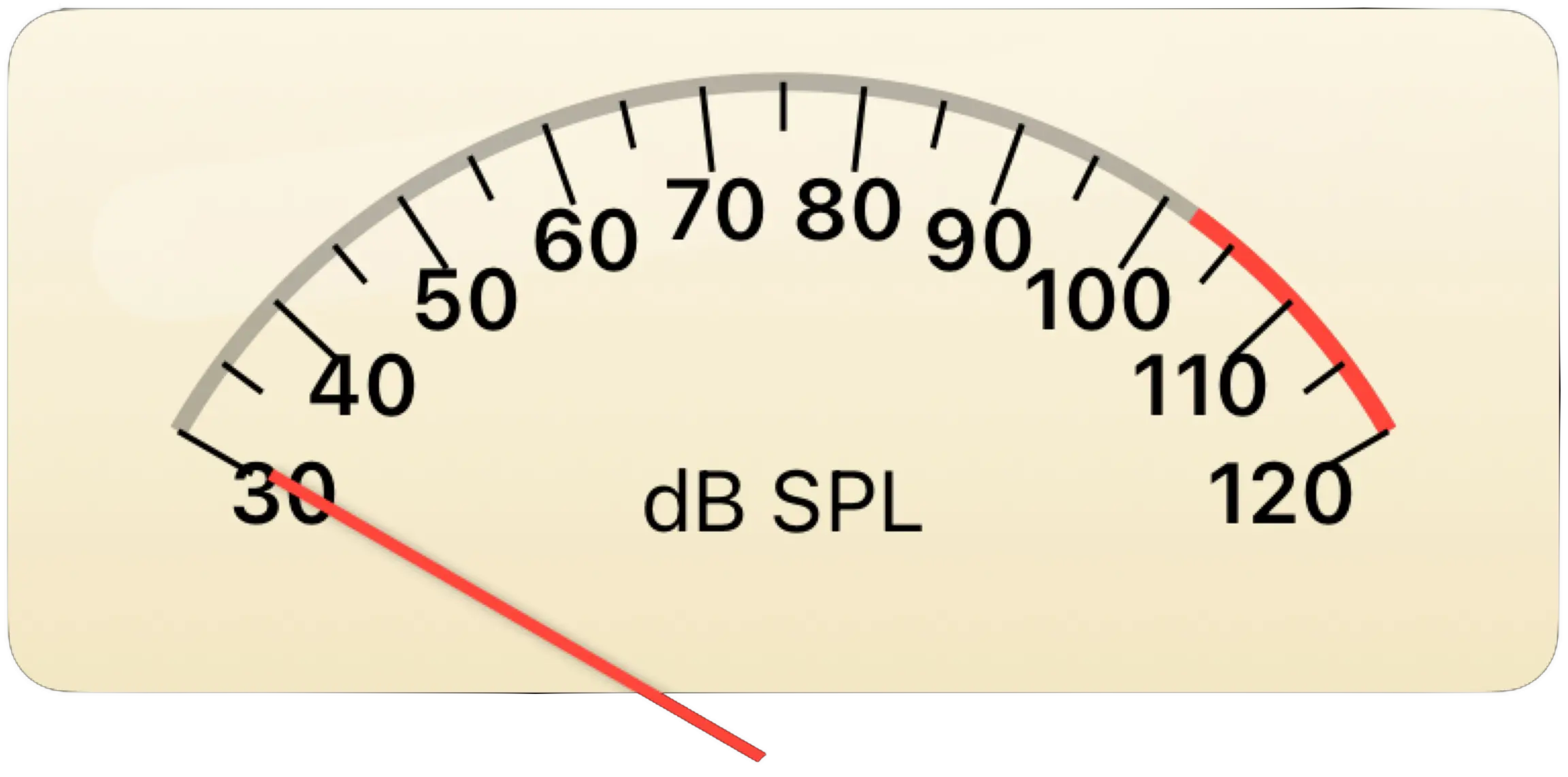
The rest is what you would expect, done well. The app uses your device's microphone to perform RMS (Root Mean Square) analysis of incoming audio, then displays estimated sound pressure levels on a beautifully rendered analog meter face with smooth needle ballistics. It covers a range of 30 to 120 dB, which spans everything from a quiet room to a very loud concert. Levels are A-weighted (dBA) or unweighted, following the shape of IEC 61672, with Fast (125 ms) and Slow (1 s) time weighting.
It's free. No ads, no subscriptions, and nothing behind a paywall. The only thing you can buy is an optional tip, and it unlocks nothing. Just a sound meter that works and looks good doing it.
The process is about as straightforward as it gets. Open the app, press start, and it listens until you tell it to stop.
Your iPhone or iPad has a surprisingly capable microphone built into it. Decibels accesses that microphone and continuously samples the ambient sound in your environment. The raw audio signal is processed using RMS analysis, which calculates the effective average power of the sound wave. This is the same fundamental approach that professional audio equipment uses to measure sound intensity.
The result is an estimated sound pressure level, displayed in decibels (dB SPL). That reading appears on the vintage VU meter face, where a physical needle moves with carefully tuned ballistics. Fast attack for sudden sounds, slower decay for the falloff. It behaves the way a real analog meter would, which makes it intuitive to read at a glance.
Below the meter you get four numbers rather than one: the level right now, large, and under it the running average (Leq), the maximum and the minimum, plus how long you have been measuring. Beside them sits LCpeak, which is a different quantity again — more on that below. A live trace along the bottom shows the last ten seconds on a fixed timeline, so a loud moment reads as a spike rather than a flat line at the top of the scale.
Press stop and the run is saved by itself. There is no Save button, which is the point: you only find out you needed one after you didn't press it. Everything you have measured is waiting behind the clock button, and any of it can be exported as a CSV.
The app works in all orientations and adapts its layout automatically to whatever device and position you're using. Portrait on an iPhone for quick checks, landscape on an iPad for extended monitoring sessions. The interface adjusts to give you the best view of the meter, the readings and the trace regardless of how you're holding the device.

Decibels covers a measurement range of 30 to 120 dB, which is where virtually all everyday sound happens. The meter and the level trace share that range, so a loud moment draws as a peak instead of flattening against a ceiling the needle can still reach.
At the low end, 30 dB is roughly the level of a quiet whisper or a very still room at night. This is about as quiet as most environments get unless you're in a recording studio or anechoic chamber. At the high end, 120 dB is the threshold of pain and roughly equivalent to standing next to a speaker at a loud concert. You really don't want to be there without hearing protection.
In between, you've got normal conversation at around 60 dB, a vacuum cleaner at 70 dB, a busy restaurant at about 80 dB, and a lawn mower at 90 dB. The 30 to 120 dB range captures every sound you'd realistically want to measure in daily life.
One thing to keep in mind: the readings from any phone based sound meter are estimates. Your iPhone's microphone is designed for phone calls and voice memos, not laboratory grade acoustic measurement. Decibels does its best to provide useful readings, and for general reference purposes it works very well. But if you need certified measurements for workplace safety compliance or scientific research, you need a calibrated professional instrument.
Readings from Decibels are estimates for general reference and should not be used for scientific or safety critical applications.
Sound meter apps tend to cram in features nobody asked for. Decibels focuses on the ones you'll actually use.
Measurements that keep themselves. This is the one that matters most day to day. Stop the meter and the run is already saved: average (Leq), maximum, minimum, duration and the full level trace, every time, with nothing to name and nothing to file. The clock button opens the history, and opening a run shows the trace it drew alongside the settings it was taken under.
Vintage VU meter display. This is the centerpiece. The meter face is modeled after classic analog VU meters from the golden age of audio equipment. Cream colored background, precise scale markings, a needle that moves with authentic ballistics. It's not just decorative. Analog meter movement is genuinely easier to read than a bouncing number because your brain processes the needle position and movement speed simultaneously. You get an intuitive sense of loudness that a digital readout alone can't provide.
A level trace, live and saved. Below the meter, a trace plots the last ten seconds on a fixed timeline while you measure. The full shape of the run — however long it went on — is kept with the saved measurement, and that is where questions like "is my office consistently noisy, or does it just spike when the HVAC kicks on?" actually get answered. A single number would miss that entirely.
Maximum, and LCpeak for impulses. The app tracks the highest level it has seen during the run, which matters because peaks are often the most relevant data point. But a time-weighted maximum under-reports a genuinely short sound: a door slam or an alarm is largely over before a Fast average has caught up with it. So Decibels also reports LCpeak, the true C-weighted peak, untimed. And if the input hits the converter's ceiling on the way, the app says the reading clipped, rather than quietly presenting a number that is really only a lower bound.
Export as CSV. A reading is more useful to someone else when they can see how it was taken. The export carries the frequency weighting, the response time and the calibration offset the run used, and then the level second by second — so a measurement you send to a landlord or a contractor still means something at the other end.
Adaptive layout. Decibels works on both iPhone and iPad, in portrait and landscape orientation. The interface rearranges itself to make the best use of whatever screen space is available. On an iPad in landscape, you get a generous two-column view with the meter on one side and the readings, controls and trace on the other. On an iPhone in portrait, the layout stacks them.
The history is the part that turns a sound meter app into a record you can act on.
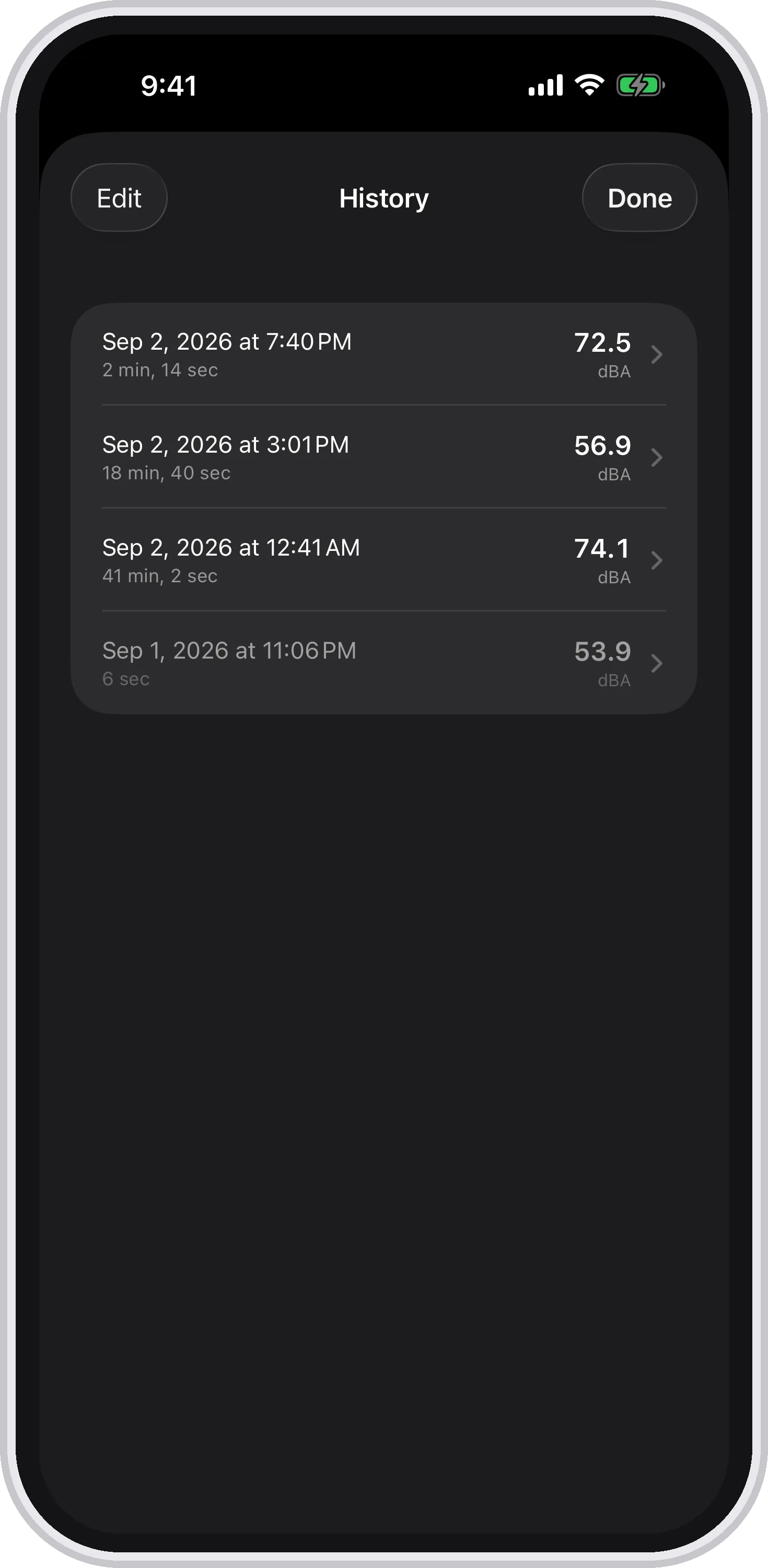
Every run you stop, with the day it was taken, how long it lasted and what it averaged.
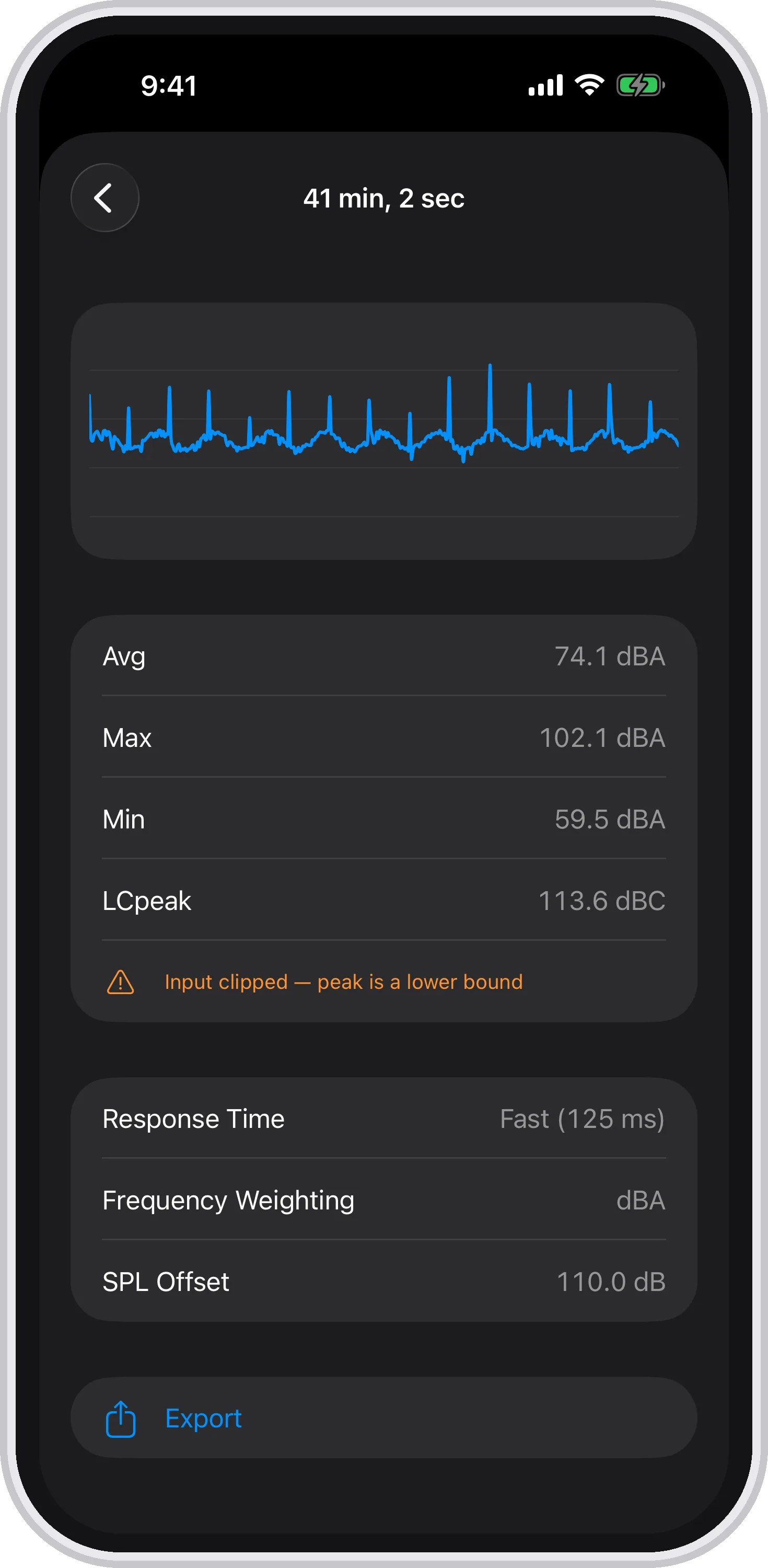
Open one and you get the whole trace, the numbers, the settings it was measured under — and a warning when the input clipped.
More people than you might expect. Once you can measure sound, you start noticing it everywhere.
Home studio folks. If you're recording music, podcasts, or voiceover at home, ambient noise is your enemy. A sound level meter app gives you a quick read on how quiet your recording space actually is. Is your room sitting at 35 dB or 50 dB? That difference matters enormously when you're trying to capture clean audio. Decibels won't replace a studio grade measurement system, but it gives you a useful baseline reference before you hit record.
Content creators. Scouting a venue for a shoot? Trying to figure out if a coffee shop is too noisy for an interview? A quick sound check with Decibels tells you what you need to know in seconds. Let it run for a minute and the saved trace tells you the rest — whether the noise is steady or comes in unpredictable bursts, which is the difference between a room you can work around and one you can't.
Office workers. Open plan offices are notoriously noisy, and noise levels directly affect productivity. If you're trying to make a case for better acoustic treatment or a quieter workspace, having actual data (even estimated data) is more persuasive than saying "it's loud in here." Let Decibels run through a working afternoon, then send your facilities team the CSV: the average it settled at, the peaks it caught, and the weighting and calibration behind both.
Travelers. Hotel room facing the highway? Airbnb next to a construction site? A sound level meter app helps you evaluate whether a space is going to be livable before you commit. It's also useful for comparing different rooms or floors if the hotel offers to move you.
Curious people. Sometimes you just want to know how loud something is. How loud is your dishwasher? Your neighbor's dog? The subway platform? Sound is invisible, and having a way to quantify it is genuinely interesting once you start paying attention.
Download Decibels from the App Store, open it, and you're measuring sound. That's the whole tutorial.
The app will ask for microphone access when you first launch it. Say yes. Without microphone access, a sound level meter is just a picture of a meter. Once you grant permission, press start and the VU meter needle begins responding to your environment.
For the most useful readings, hold your phone at arm's length away from your body. Sound reflects off surfaces (including you), so a little distance helps the microphone get a cleaner sample. Don't cover the microphone with your hand or a case that blocks the mic opening. And try to keep the device relatively still, since moving it quickly through the air can create wind noise that affects the reading.
Beyond that, just watch the meter. The VU needle gives you an immediate, intuitive sense of the sound level, the numbers underneath hold the running average and the extremes, and the trace shows how things are moving. You don't have to stare at it: press stop when you're done and the whole run is waiting in the history.
Decibels is free with no strings attached. No ads, no premium tier, no subscriptions. You get the full app, every feature, for nothing. Your measurements stay on your device, too: the app records no audio, only the level, and asks for no account, no location and no identifiers.
A sound level meter that's actually nice to look at. Free on the App Store.