What actually matters in a sound level meter app, and what's just noise.
There are dozens of sound meter apps on the App Store. Most of them are fine. Some of them are great. A few are terrible. Here's how to tell the difference.
Before we get into specifics, let's establish something: every decibel meter app on your iPhone is using the same microphone hardware. The differences between apps come down to how they process the audio signal, how they display the results, what additional features they offer, and how much they charge you for the privilege.
With that in mind, here are the things that actually matter.
Accuracy within reason. No phone app will match a calibrated professional meter. But a good sound meter app should give you readings that are consistently in the right ballpark. If your quiet room reads 40 dB and a loud conversation reads 65 dB, those numbers should be roughly proportional to reality. Consistency matters more than absolute accuracy here. You want an app that reliably reflects changes in sound level, even if the absolute number is a few dB off from a professional meter.
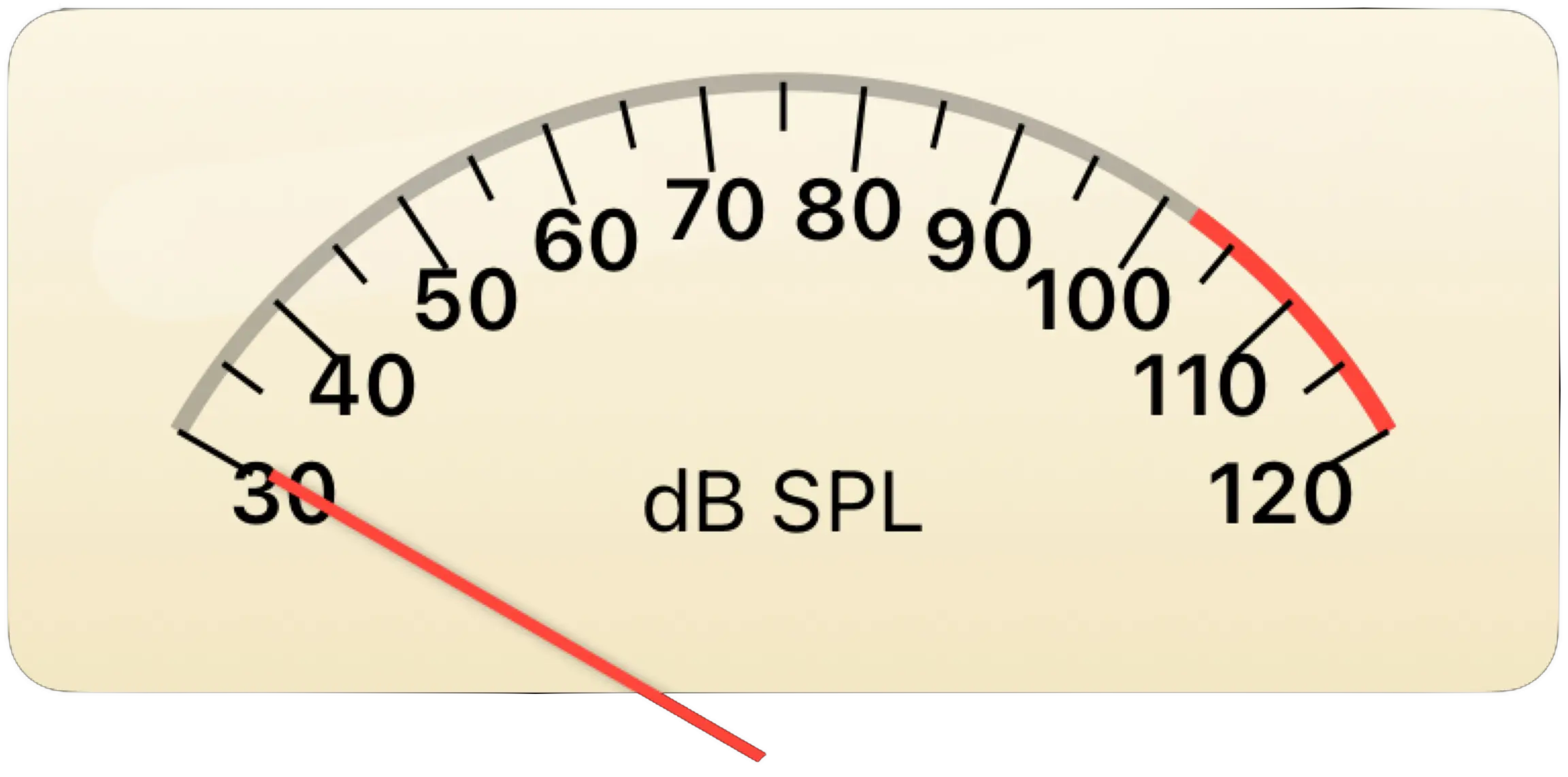
Readability. This is more important than most people realize. A decibel meter is something you glance at. You're not studying it like a textbook. The display needs to communicate the current sound level instantly, at a glance, in any lighting condition. A number on a screen works. A well designed analog meter works better because your brain processes the needle position and movement faster than it reads and interprets a changing number.
Visual design. You're going to be looking at this app. It should look good. Sound meter apps that look like they were designed in a basement in 2009 still work, technically, but using them feels like operating industrial software. The best sound level meter apps treat the interface as a feature, not an afterthought.
It should keep what you measured. This is the one most people don't think to check until it bites them. You stand in the noisy room, you watch the needle, you get a number — and then you close the app and it's gone. A meter that only shows you the present moment makes you the storage medium. The useful thing to ask of a sound meter app is not just "what is it now?" but "what was it, for the twenty minutes I was standing there?"
Useful features, not feature bloat. A level trace over time? Useful. Knowing the loudest moment? Useful. A frequency weighting that matches what standards actually specify? Useful, and cheap to offer. FFT spectrum analysis and 47 export options? That's great if you're an acoustic engineer, but if you just want to check how loud your apartment is, it's clutter. The best apps give you what you need and stay out of the way.
Price. Some very good sound meter apps are paid. That's fair. But the paid ones typically charge between $3 and $15, and some of the most popular ones run on subscription models. For an app category where the underlying measurement capability comes from your phone's hardware, paying a monthly subscription feels steep. Free apps with no catches are rare in this category, but they exist.
A fair look at what's available before we talk about our own app.
The App Store has a solid range of sound meter apps at this point. Apple's own Health app on iPhone includes a noise level monitoring feature, though it's designed more for headphone exposure tracking than active sound measurement. It runs in the background and logs environmental sound levels, which is useful for awareness but not the same as a dedicated measurement tool you can actively monitor.
NIOSH (the National Institute for Occupational Safety and Health) released a Sound Level Meter app that was well regarded for its accuracy and straightforward design. Several third party apps like dB Meter, Decibel X, and Sound Meter have been around for years and offer various combinations of features, calibration options, and frequency weighting.
The paid apps in this space have traditionally been where you went for the technical features: frequency weighting, data export, calibration against a reference level, detailed logging. Some of them go considerably further than that — octave band analysis, dosimetry, reporting templates — and if you're doing semi professional acoustic work and need those capabilities, a paid app with good reviews is worth considering. What has changed is that the basics on that list are no longer what you have to pay for.
The free apps tend to be more basic, and many of them support themselves with ads. Some display a banner ad during measurement, which is exactly as annoying as it sounds when you're trying to read a sound level. Others gate features behind in app purchases, so the free version is really just a demo.
And then there's the design question. Most sound meter apps look clinical. They show a number, maybe a bar graph, maybe a chart. They're functional but utilitarian. The display is information, not experience. That's fine if all you care about is the number. But if you want something you'd actually enjoy using and looking at, the options thin out considerably.
We built Decibels because we wanted a sound meter app that we'd actually want to use. Here's what that means in practice.
The VU meter is the whole point. Classic VU meters from the golden age of audio are beautiful objects. The cream colored face, the precise scale markings, the way the needle swings with momentum and settles back naturally. They communicate information through movement and position in a way that a bouncing digital number simply cannot. When you watch a VU meter, you get an intuitive, almost physical sense of sound intensity. We recreated that experience digitally, with carefully tuned needle ballistics that match how real analog meters behave. Fast attack for transients, smooth decay for the release. It looks gorgeous and it communicates sound levels more effectively than a number on a screen.
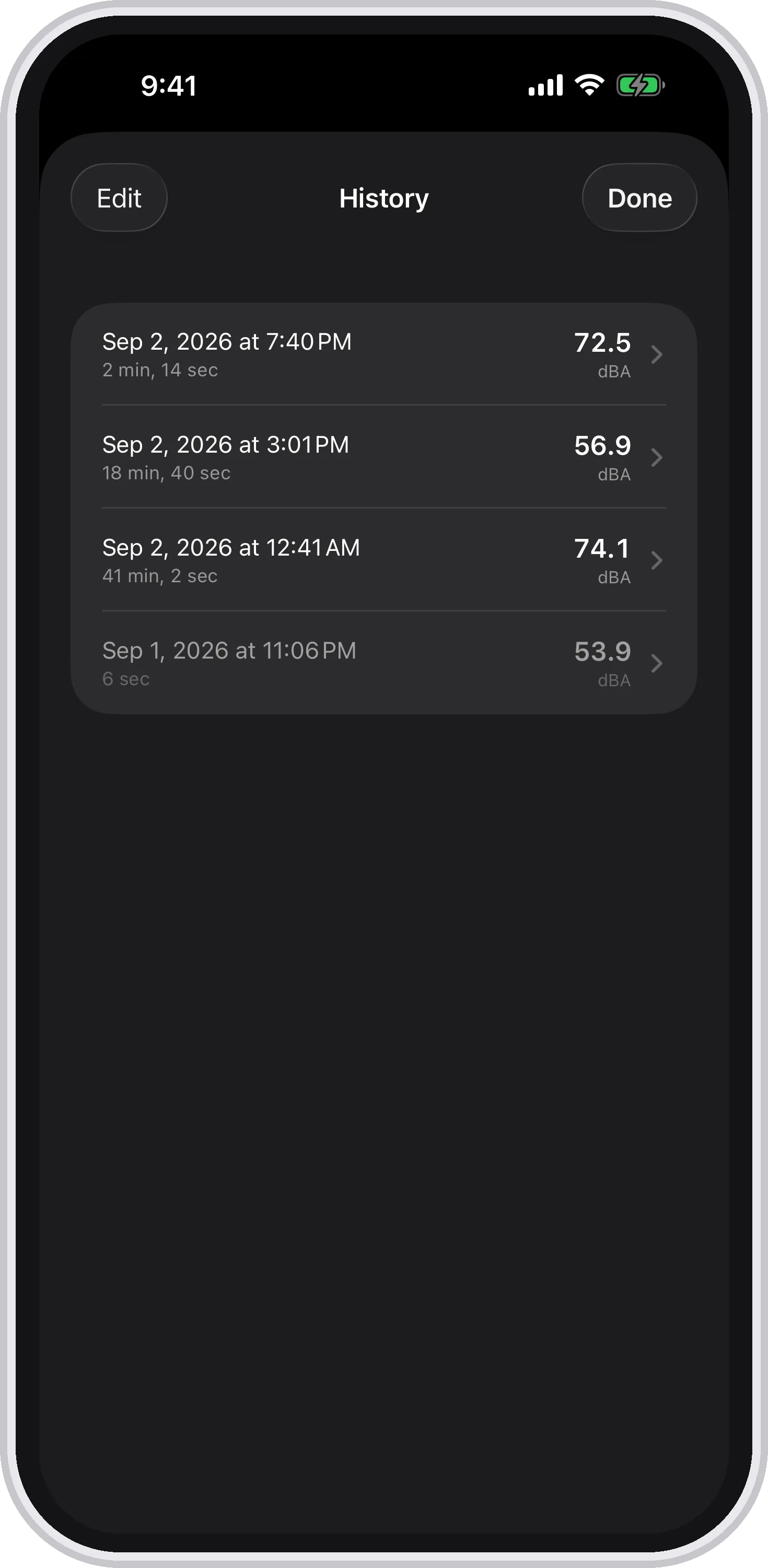
Every measurement keeps itself. A single dB reading is a snapshot. A run is a narrative. Press start, press stop, and Decibels saves the whole thing on its own: the average (Leq), the maximum, the minimum, how long it lasted, and the full level trace. There is no Save button, deliberately — you only find out you needed one after you didn't press it. The clock button opens the history, and the runs stay there until you delete them. When the HVAC cycles on, it's in the trace. When traffic picks up outside, it's in the trace. When your neighbor starts their weekly drum circle, it's a spike you can point at later.
Four numbers instead of one. The level right now sits large at the top, with the running average, maximum and minimum underneath it and the elapsed time alongside. A live trace at the bottom shows the last ten seconds on a fixed timeline. That combination answers the two questions people actually have — how loud is it, and how loud has it been — without you having to watch continuously.
LCpeak catches what an average misses. You can't stare at a meter all day, and the maximum remembers the loudest moment so you don't have to. But a time-weighted maximum quietly under-reports short, hard sounds: a door slam or a smoke alarm is largely finished before a Fast average has caught up with it. Decibels also reports LCpeak, the true C-weighted peak, untimed, which is the number that actually describes an impulse. If the input clipped on the way, the app says so instead of presenting a figure that is really only a lower bound — which is the more honest answer, even though it is the less impressive one.
It exports, and the export explains itself. Any saved run can go out as a CSV, and the file carries the frequency weighting, the response time and the calibration offset the measurement was taken under, followed by the level second by second. That matters more than it sounds: a bare column of decibel numbers is not something a landlord, a contractor or a council officer can do anything with, because they can't tell how it was measured. This one says so on its face.
Adaptive layout because people hold their phones differently. Decibels works on iPhone and iPad, in portrait and landscape. The interface rearranges itself automatically. On an iPad in landscape, you get a spacious two-column view with the meter on one side and the readings, controls and trace on the other. On an iPhone in portrait, it stacks them efficiently. You never have to rotate your device or squint at a layout that wasn't designed for your screen orientation.
Decibels is free. Not "free with ads." Not "free with a premium upgrade." Free.
There's no ad banner obscuring half the meter. There's no subscription wall that activates after three days. There's no in app purchase to unlock the chart feature. You download the app, you get the complete app, and you never pay anything.
We're a small studio that builds apps because we enjoy building them. Decibels exists because we wanted a sound meter that looked as good as the readings it provides. We didn't build it to be a revenue stream, so there's nothing to monetize. You get the whole thing for nothing.
In a category where some apps charge $5 to $15, and others run on $2 to $4 per month subscriptions, free with no catches is unusual. But it shouldn't be. The measurement capability comes from your phone's hardware. The app should add value through design and thoughtful features, and it shouldn't cost you a monthly fee to access the microphone you already own.
We'd rather be upfront about the limitations than have you discover them after downloading.
It's not a calibrated instrument. Decibels uses your iPhone or iPad's built in microphone, which is not a calibrated measurement transducer. Readings are estimates. They're useful estimates, they're consistent estimates, but they're not certified measurements. If you need readings that would hold up in a legal dispute, a workplace safety audit, or a scientific study, you need professional equipment.
Its weighting is not certified, only shaped. Decibels applies A-weighting (dBA) or leaves the signal unweighted, following the curves specified in IEC 61672, and uses C-weighting for the peak. That is the right shape, applied properly. What it is not is a verified conformance to any class of that standard, because conformance is a claim about the whole instrument — microphone included — and the microphone here is the one Apple fitted to your phone.
It won't measure while you're doing something else. Leaving the app ends the run. Background audio recording is not something Apple approves for an app that plays nothing, so rather than pretend, Decibels closes the measurement out with the duration it genuinely had. If you need unattended monitoring over hours while you use the phone for other things, this is not the tool. If you can leave the phone measuring in one place, it is.
It doesn't replace professional tools. This applies to every phone based sound meter, not just Decibels. For OSHA compliance, environmental impact assessments, audiological testing, or any application where measurement accuracy has legal or safety implications, use calibrated professional equipment. Decibels is a reference tool for everyday curiosity and general awareness, and it's very good at that.
If you want a decibel meter app that works well, looks great, and costs nothing, Decibels is hard to beat.
The vintage VU meter design isn't just aesthetic indulgence. Analog meter movement is genuinely more readable than a bouncing number, and the crafted needle ballistics make monitoring sound levels a pleasure instead of a chore. Add measurements that save themselves, four numbers instead of one, LCpeak for the impulses an average flattens, CSV export that carries its own settings, and an adaptive layout that works on every device and orientation, and you've got a complete sound level meter that you'll actually enjoy using.
It's not trying to be a professional acoustic analysis tool. It's a beautifully designed, thoughtfully built sound meter for people who want to understand the noise around them. And it's completely free with no ads and no subscriptions.
If you need a certified instrument — readings that will stand up in a workplace audit or a legal dispute — no phone app is the answer, ours included. But if you want a sound level meter that does the fundamentals really well, keeps what you measured, and looks gorgeous doing it, give Decibels a try.

The sound meter app that's actually nice to use. Free on the App Store.